
WARDOGS Helicopter Guide: Master Transport, Resupply and Flight
In WARDOGS, winning the fight is not only about what happens on the ground.
BULKHEAD’s large-scale tactical FPS combines infantry combat, vehicles, construction and destruction across a battlefield where up to 100 players can fight at once. And among the different ways to contribute to your team, helicopters open up a very different role: pilot.
Instead of chasing every firefight, you can help move players around the battlefield, deliver supplies where they are needed and support your team from the air.
That makes flying more than a way to get from A to B. A good helicopter pilot can become an important part of how a team moves and reacts across the battlefield.
So, if you are planning to spend some time in the cockpit, here is what you need to know about helicopter gameplay in WARDOGS, and how dedicated flight controls can make the experience even more engaging.
Why helicopters matter in WARDOGS
WARDOGS is designed around combined-arms warfare, meaning infantry, ground vehicles and aircraft all share the same battlefield.
For helicopter pilots, that creates a different set of priorities.
Your objective is not necessarily to rack up as many eliminations as possible. Sometimes, the most useful thing you can do is get another group of players where they need to be.
A helicopter can help your team:
- move quickly across large areas of the battlefield;
- transport players toward active objectives;
- deliver supplies to teammates;
- reposition when the fight moves elsewhere;
- support an assault without being directly involved in the firefight.
It creates a gameplay loop that should feel immediately familiar to players who enjoy transport and support roles in large-scale multiplayer shooters.
And it also changes the way you need to think as a pilot.
Getting airborne is only the beginning.
A good helicopter pilot thinks ahead
Flying directly toward the objective may be the fastest route, but it is not necessarily the safest one.
Before taking off, look at what is happening around your destination. Where is the fighting concentrated? Which direction are enemies likely to be watching? Is there somewhere nearby where you could drop your passengers without exposing the helicopter for too long?
Approaching from behind terrain or buildings can sometimes be more useful than taking the shortest possible route.
The same applies when you reach the landing zone.
A perfect landing in the middle of a firefight is not always the best landing. Your priority is to give your passengers a useful position while keeping enough room — and momentum — to get back into the air.
That makes smooth, deliberate control especially valuable.
And this is where understanding the basic helicopter inputs becomes useful.

Understanding helicopter controls: cyclic, collective and yaw
Helicopters require several movements to be managed at the same time.
Even in a game rather than a full flight simulator, understanding what each input is doing can make controlling a helicopter much more intuitive.
Pitch and roll: controlling your direction
The cyclic controls the helicopter’s movement forward, backward and sideways.
Push forward and you can transition into forward flight. Pull back and you can slow down or move backward. Moving left or right controls roll.
When approaching a landing zone, small corrections become particularly important. Large inputs can quickly turn a controlled approach into an awkward landing.
A flight stick is naturally suited to these movements because pitch and roll can be controlled independently across two axes.
Collective: managing lift
The collective changes the lift generated by the rotor system and plays a major role when climbing, descending and maintaining altitude.
With a dedicated flight-control setup, a throttle axis can provide a progressive physical input for functions such as helicopter power or collective-style control, depending on the mappings available in WARDOGS.
This becomes particularly useful during an approach, when you are simultaneously managing direction, altitude and orientation.
Yaw: keeping the helicopter facing where you want it
The final piece is yaw.
Rather than tilting the helicopter, yaw rotates it around its vertical axis. It helps you point the aircraft in the right direction, make corrections during low-speed flight and align yourself during an approach.
It is one of those controls that can seem secondary until you start trying to make precise landings.
Then it becomes essential.
From mouse and keyboard to dedicated flight controls
You do not need an elaborate cockpit to start flying helicopters in WARDOGS.
Mouse and keyboard or other available control methods can be enough to discover the role and learn the fundamentals.
But if helicopter operations become one of your favourite ways to play, separating the major flight inputs across physical controls can create a very different experience.
Instead of managing several commands through keys, a flight setup gives your hands — and potentially your feet — dedicated controls for the different movements of the aircraft.
A flight stick can handle pitch and roll.
A throttle provides a progressive physical axis for power or collective-style inputs.
And a twist axis or rudder pedals can be used to manage yaw.
The objective is not simply to make WARDOGS more complicated.
It is to make flying feel more natural.
Build a flight setup around the way you play
There is no single flight setup that suits every player.
Some may want a straightforward HOTAS configuration that lets them jump between infantry gameplay and helicopter operations. Others may prefer a more complete setup with separate rudder pedals and additional physical controls.
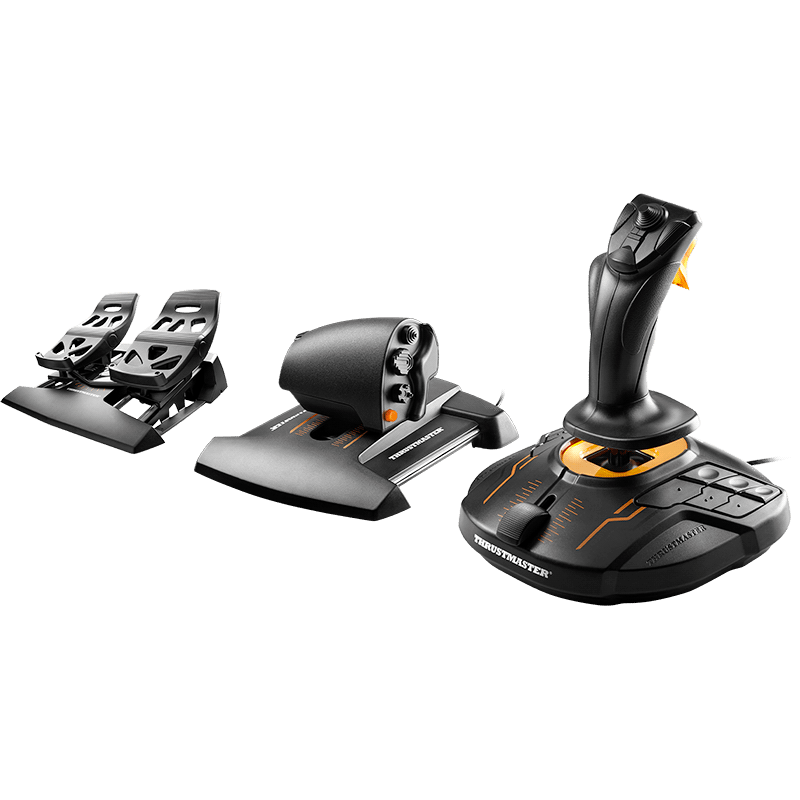
The T.16000M FCS range is particularly well suited to building a modular flight setup.
A T.16000M flight stick can cover pitch and roll while its twist axis can provide rudder-style control. Adding a TWCS throttle gives you a separate progressive axis, while a TFRP pedal set can move yaw control from your hands to your feet.
Together, the T.16000M FCS Flight Pack creates a layout that translates naturally to the main helicopter inputs: cyclic-style movement, collective-style control and yaw.
But it is not the only way to approach WARDOGS.

Players looking for different levels of control can also explore setups built around the T.Flight Hotas X, the T.16000M range or the premium HOTAS Warthog range, depending on how far they want to take their flight setup.
For the launch of WARDOGS, we have brought these options together in one place, including dedicated bundles designed to make choosing a setup easier.
Five tips for your first helicopter operations in WARDOGS
Whatever controls you choose, equipment will not replace good flying.
- 1. Practise away from the action : before trying to land with a squad depending on you, spend some time learning how the helicopter responds. Practise take-offs, turns, slowing down and landing somewhere quiet.
- 2. Make small corrections : smooth inputs are usually easier to recover from than aggressive ones. This becomes especially important close to the ground.
- 3. Plan your landing before you arrive : do not wait until you are directly above your destination to decide where to land. Identify your approach, landing area and exit route early.
- 4. Remember that your passengers are the mission : for a transport pilot, surviving long enough to deliver your team can be more valuable than flying straight into the centre of the battle.
- 5. Learn when not to land : sometimes the situation changes while you are approaching. If a landing zone suddenly becomes too dangerous, going around and trying another approach may be better than forcing the landing.

Find your role in the skies
One of the most interesting things about WARDOGS is that contributing to your team does not have to mean playing the same role every match.
You can fight on the ground.
You can operate vehicles.
You can build and defend positions.
Or you can climb into a helicopter and become the person who gets everyone else where they need to go.
For players who enjoy that last option, learning to manage pitch, roll, collective and yaw adds another layer to the experience.
A dedicated flight setup can make those controls feel more intuitive, but becoming a good WARDOGS pilot ultimately comes down to something more important: understanding the battlefield and knowing where your team needs you next.
Discover the Thrustmaster flight setups and bundles selected for WARDOGS.
Available control options, mappings and peripheral support may vary depending on the current version of WARDOGS. Check the latest game settings and compatibility information when configuring your setup.